an admin dashboard users couldn't wait to use
overview
Admins could see a list of environments, but had no useful view of their compliance status. I led the design of Anaconda Cloud’s first operational dashboard, helping admins spot environments that needed attention, identify non-compliant packages, and understand what to fix.
Role
Lead UX Designer
product
Cloud
collaborators
Product manager, engineer manager, 2 senior engineers, and 1 user research
timeline
Q2-Q3
constraints
Limited engineering capacity, tight timelines, and gaps between design and implementation.
early impact
Up to 50% faster remediation
Some admins cut remediation time from four minutes to two during beta testing.
fewer support requests
Tickets about non-compliant environments fell to nearly zero within the beta group.
admins wanted access. now.
Testing participants asked to start using the dashboard as soon as possible.
the problem
Admins needed a way to identify compliance issues across their organization because the existing environment list provided no meaningful status information. Checking each environment manually makes it difficult to spot risks and prioritize fixes.
Business Need
Support customer renewals by making the policy engine’s value visible, helping customers understand the risks it detects and where action is needed.
User Need
A clear view of which environments need attention, what’s wrong, and what to fix first.
earlier designs
admins needed answers, not just a list
The existing experience listed environments but gave admins little insight into what needed attention. Our product manager’s prototype introduced a dashboard vision. I built on that starting point by exploring how it could help admins understand compliance and act on issues.
The existing environment list and user flow
The product manager’s early concept

What brings admins to the dashboard?
What needs their attention the most?
What should they do next?
research & synthesis
Three questions the dashboard needed to answer
Through a heuristic evaluation, competitive analysis, and admin interviews, I identified three needs: understand compliance at a glance, know what to do next, and investigate issues without getting lost in the details.
heuristic evaluation

competitive analysis

1
Where do we stand?
Admins needed an immediate view of compliance across their organization, without checking each environment individually.
2
What needs action?
Knowing something is wrong isn’t enough on its own; admins need a clear path to actually enable their team to fix it.
3
What’s behind the issue?
Admins needed a clear summary with a path to the affected environments, packages, and violations.
ideation
turning admin needs into design direction
I translated the research into two principles to guide what the dashboard showed and how admins moved through it.
Start with the questions admins ask
Map the decisions admins need to make and the workflows they follow, then choose the data and charts that support them.
Show what matters, reveal the details
Put essential compliance information first, with a clear path to deeper detail when admins need to investigate.


FEATURE PRIORITIZATION
Building what admins needed most
I used admin interviews and competitive analysis to identify features that would help admins spot compliance issues and coordinate fixes. I then ranked them using RICE, weighing reach, impact, confidence, and effort to prioritize:
Environments table
Compliance overview
Alerts inbox
Environment detail drawer
Developer notifications
wireframe exploration
Two ways to get from insight to action
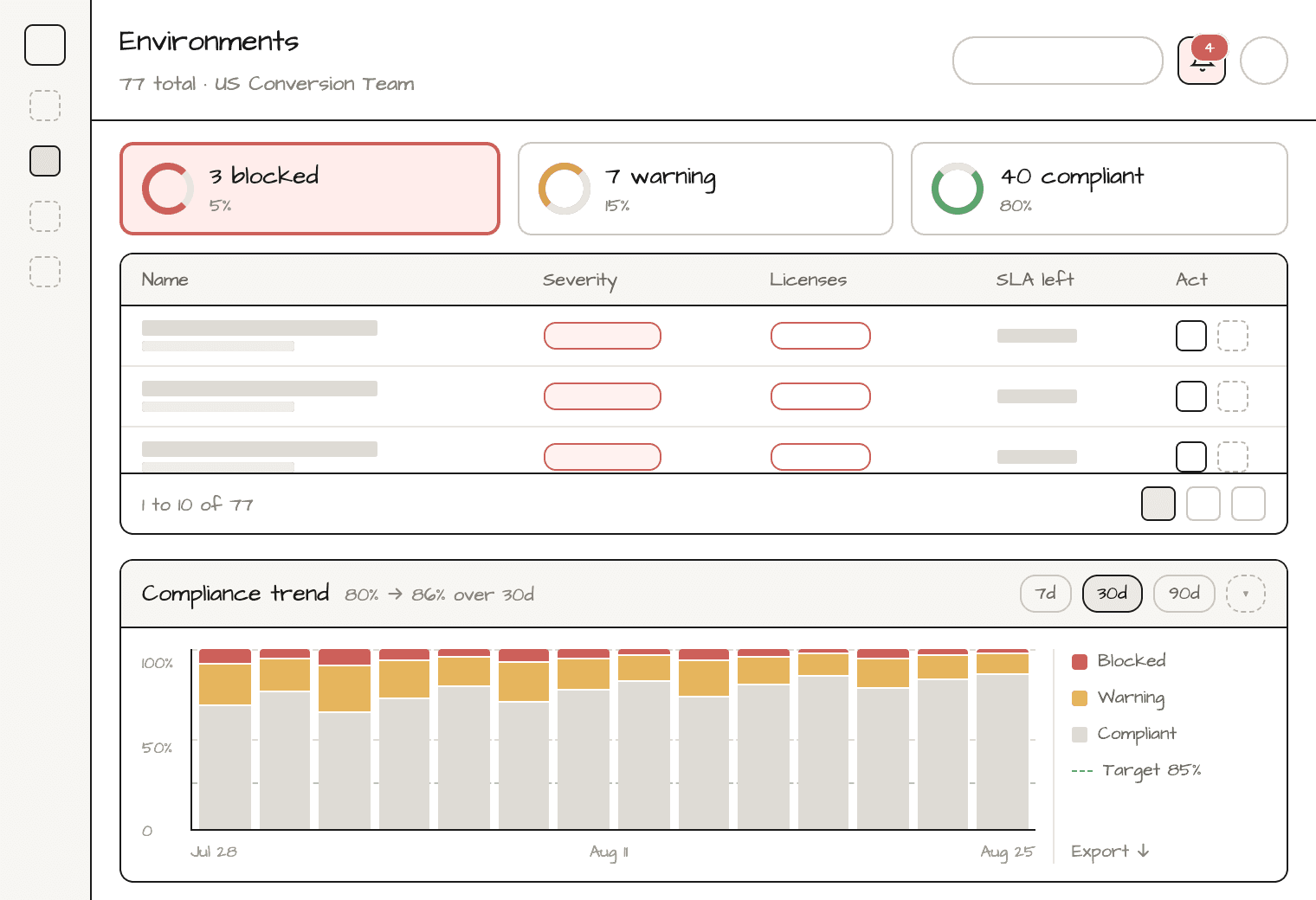
I developed both concepts into wireframes, exploring how admins could scan compliance, investigate an environment, review alerts, and track changes over time.
option 1
Scan the status, explore the details
Summary cards and a single environment table provide an overview, with drawers for investigating issues and taking action.
COMPLIANCE OVERVIEW

ENVIRONMENT DETAILS AND ACTION

Alerts

Compliance trend
option 2
Focus on what needs attention
Environments are grouped by status, helping admins narrow their focus before opening details. Compliance trends sit at the top of the dashboard.
COMPLIANCE OVERVIEW

ENVIRONMENT DETAILS AND ACTION
Alerts

Compliance trend

user testing
We compared two dashboard concepts, then conducted moderated usability testing on the preferred design to understand how well it supported admin tasks.
WHAT four admins helped us uncover
Using the Claude prototype I created, we gathered four different admins across various regions to test our two dashboards concepts. Our key insights include:
Connect admins to developers. Admins needed a way to share issues and remediation guidance with the people responsible for fixes.
Keep the table. Participants found Concept 1’s table easier to scan and understand.
Make status labels explicit. Replace “warning” with “non-compliant” to clarify what needed attention.
Make trends easier to explore. Participants wanted a clearer, more interactive view of compliance over time.
Still too cluttered: Admins wanted a less cluttered overview table that they could click into for further exploration.

final design
“When can we start using this?”
Testing showed that admins needed a clearer connection between the dashboard and the steps around it. I refined the journey from policy creation to remediation, keeping two questions central: which environments need attention, and how can we help teams fix them?
Final Version after usability testing:

early impact
Up to 50% faster remediation
During beta testing with two companies, some admins reduced remediation time from roughly four minutes to two.
fewer support requests
During the beta, support tickets about non-compliant environments dropped to nearly zero. Results were limited to the beta group, before broader adoption.
5 of 5 design issues resolved
Before handoff, I resolved all five issues flagged during design review, including severity indicators, icon consistency, and the layout of alerts and trends.
reflections
Leading meant looking beyond the screen
My first major project as lead product designer taught me to take ownership of the full experience, from shaping the workflow to keeping delivery on track.
1
Make QA a habit
Implementation drift showed me that handoff needed regular follow-through. I introduced weekly sandbox reviews to catch discrepancies while the work was still in progress.
2
keep the project moving
I learned to take a more active role in coordinating delivery, starting weekly check-ins to surface blockers, clarify next steps, and maintain momentum.
3
Follow the whole journey
I initially focused too closely on the dashboard. Testing pushed me to consider what happened before and after it, including how admins passed issues to developers for remediation.